Turbo Studio
Images in seconds, video clips in about a minute, all on your own Mac. Drop any picture in as inspiration. No cloud, no account, no queue.
Typing a prompt, generating an image, then using it as the inspiration for a video clip. Recorded on a 16 GB M1 Pro.
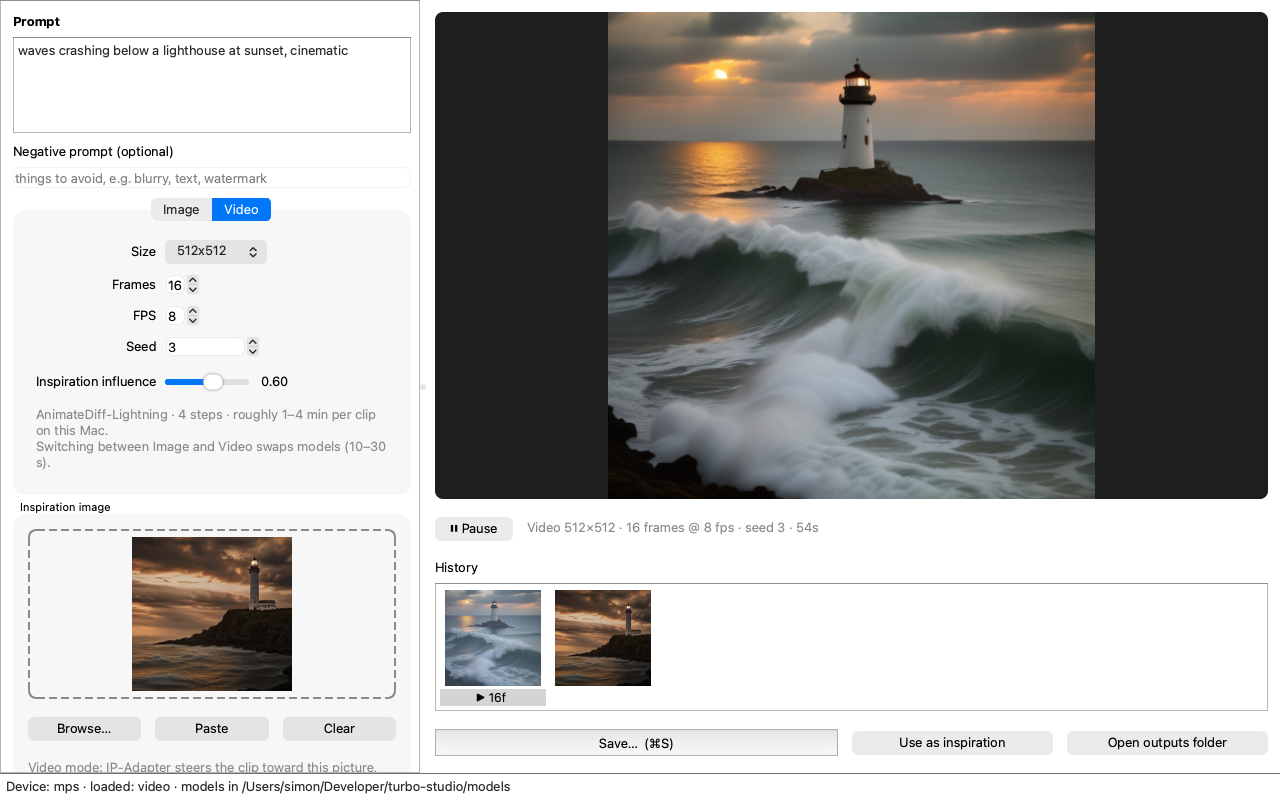
Prompt and settings on the left, preview and history on the right. Drag an image anywhere onto the window.
What it does
Text to image
SDXL-Turbo in 1 to 4 steps, 512² up to 1024². About five seconds per picture.
Text to video
AnimateDiff-Lightning, 8 to 32 frames at 512². About a minute for a 16-frame clip.
Inspiration image
Drag, browse or paste an image. It seeds image-to-image for pictures and steers videos through IP-Adapter, each with its own slider.
Preview, history, save
Looping playback, a strip of everything you made this session, save as PNG, JPEG, MP4 or GIF, and one click to reuse a result as inspiration.
Fits in 16 GB
One model in memory at a time, fp16 throughout, and a chunked self-attention processor that keeps 16-frame clips from running out of memory on Apple's MPS backend.
Yours
MIT licensed. Models download once into a plain folder you can see, never into a hidden cache.
Quick start
git clone https://github.com/ShimonNavon/turbo-studio.git
cd turbo-studio
scripts/setup.sh          # .venv, install, download the models (~15 GB)
.venv/bin/turbo-studio    # opens the window

scripts/make_app.sh --install /Applications   # optional: a double-clickable Mac app
Needs macOS on Apple Silicon (tested on an M1 Pro with 16 GB), Python 3.10 to 3.14, and about 15 GB of disk for the four models. The README covers manual installs, configuration and troubleshooting.
Under the hood
| Model | Role | Size |
|---|---|---|
| SDXL-Turbo | images, fp16 | 6.9 GB |
| epiCRealism | SD1.5 base the video model runs on | 4.3 GB |
| AnimateDiff-Lightning | 4-step motion adapter | 0.9 GB |
| IP-Adapter | lets an image steer the video | 2.6 GB |
Each model carries its own license on its model card; SDXL-Turbo is non-commercial unless licensed from Stability AI.
Let's build this together
Turbo Studio was made for one Mac and would love to work on yours. NVIDIA cards, Intel Macs, Linux boxes, 8 GB machines, UI ideas, new engines: all of it helps. The good first issues are scoped to be approachable, Discussions is open for questions and show-and-tell, and CONTRIBUTING.md has the two-minute setup.